

Appearance
Connections
Connections are part of Qorekit Pro.
A connection says where requests to another service go and how they sign in: an online shop's API, an accounting service, a chat, an SMS service. The Send a request steps of automation rules choose one, and give only the path under its address; Send an SMS steps choose an SMS connection. Administrators make them in Administration › Connections; people who manage automation rules see their names.
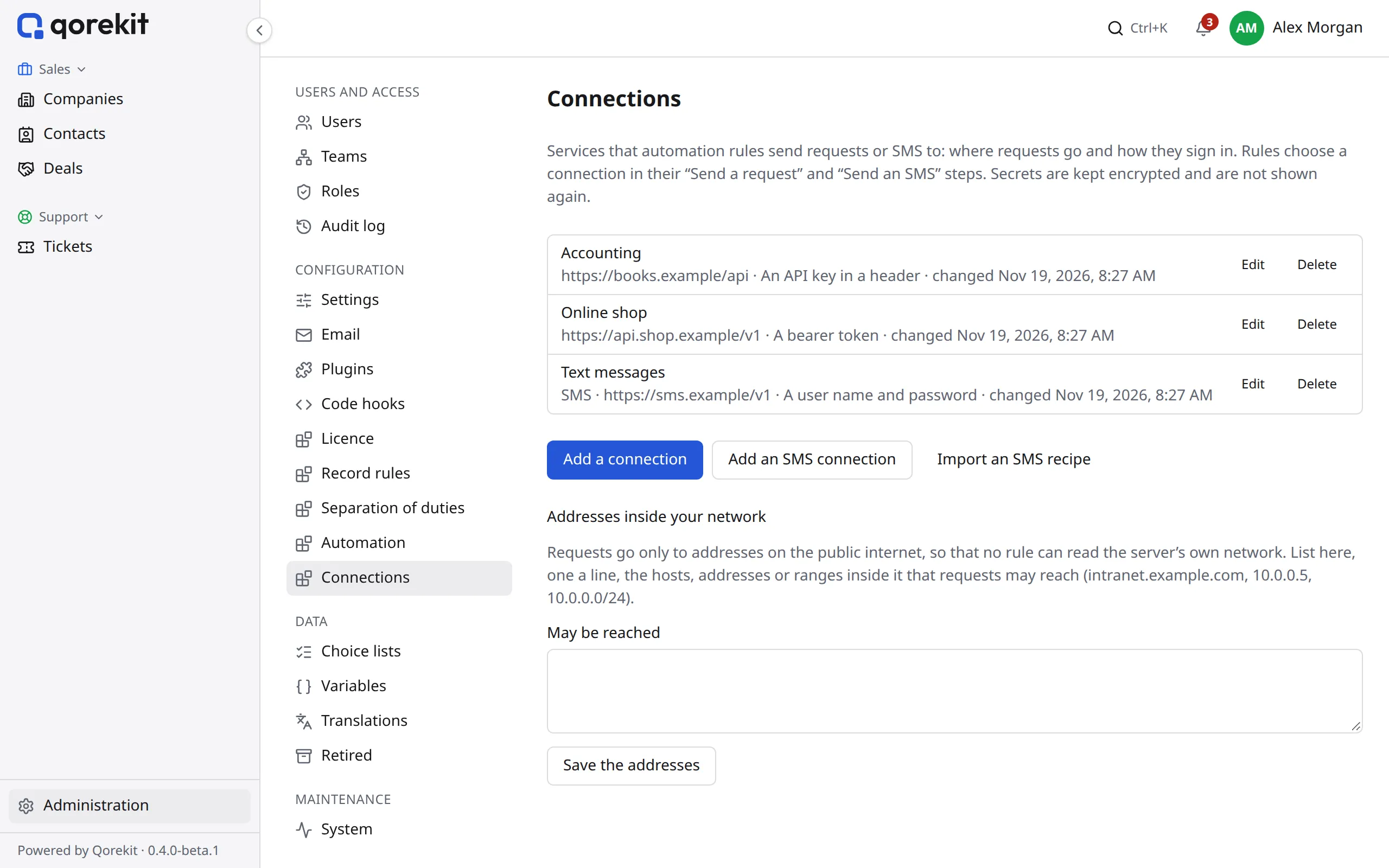
| Setting | What it does |
|---|---|
| Name | How steps show it |
| Address | The start of every request's address, such as https://api.example.com/v1; a step adds its path |
| Signing in | None, a bearer token, an API key in a header (its name, such as X-API-Key) or in the address (its parameter), or a user name and password |
| Signing secret | Optional. Requests then carry X-Qorekit-Timestamp and X-Qorekit-Signature (sha256= and the HMAC-SHA256 of the timestamp, a dot and the body), for the service to check that they come from you. Make one writes a long random secret |
| Headers | Sent with every request, such as a version the service asks for |
Passwords, tokens, keys and signing secrets are kept encrypted with the installation's key and are not shown again: to change one, type a new one. If the installation's key changes, give them again. Give a service's key under Signing in (an API key in a header or in the address), not among the Headers: headers are kept as they are written, and shown again.
A connection's keys act for whoever uses it. Only super admins put a connection in a rule, unless Rule managers may use it in their rules is ticked: then everyone who manages automation rules sees it, and may send it any request.
Try it sends a GET request to a path under the address, as the connection is saved, and shows the answer. A connection that rules use cannot be deleted until their steps no longer name it.
SMS connections
Add an SMS connection makes a connection that also says how the service takes a text message. Its address, signing in and headers are as above; what the kind of a connection is can't be changed once it is saved. Under Sending an SMS:
| Setting | What it does |
|---|---|
| Method and path | The request, under the connection's address, such as POST /messages |
| Query values, body | What the request sends: JSON, form fields, or nothing but query values. Values can put in {{ phone }} (the number, +14155550132), {{ phone_digits }} (14155550132), {{ text }} (the message), {{ sender }}, and {{ unicode }}, true when the message needs Unicode ({% if unicode %}unicode{% else %}text{% endif %}). In JSON, values go inside strings: "{{ text }}" |
| Taken when it answers | The HTTP statuses that mean the service took the message: 2xx (any 200 to 299), or a list such as 200, 201. Some services answer 200 to every request: give the path in their JSON answer that says how it went, such as messages.0.status, and the value that means it went (0); with no value, any value but false, 0 or nothing will do |
| The message's id is at | The path in the JSON answer of the message's id, such as sid or messages.0.id, kept with each message sent |
| Default country code | For numbers written without one, such as (415) 555-0132: 1 for the US and Canada, 44 for the UK. Numbers in phone fields are kept with their country code already |
| Sender | A number or a name the service allows you to send from, for {{ sender }} |
Send a test SMS, on a saved SMS connection, sends a real message to a number you give and shows the service's answer, whether it took the message and its id. Tests are not counted towards the rules' hourly limit (see How many go out).
Recipes
A recipe is an SMS connection without its secrets, as JSON: Export the recipe saves one, and Import an SMS recipe makes a new connection from one pasted or chosen. Give its secret (and replace the account ids in the address and the user name), set the sender, then save it and send a test.
These recipes are a start for well-known services. Services change their APIs: check their own documentation if a test fails.
Twilio. The user name is the Account SID, the password the Auth Token; the sender is a Twilio number.
json
{
  "format": "qorekit-sms-connection", "version": 1, "name": "Twilio",
  "base_url": "https://api.twilio.com/2010-04-01/Accounts/ACxxxxxxxxxxxxxxxxxxxxxxxxxxxxxxxx",
  "auth": "basic", "auth_name": "ACxxxxxxxxxxxxxxxxxxxxxxxxxxxxxxxx", "headers": [],
  "sms": {
    "method": "POST", "path": "/Messages.json", "query": [],
    "body": { "kind": "form", "fields": [
      { "name": "To", "value": "{{ phone }}" },
      { "name": "From", "value": "{{ sender }}" },
      { "name": "Body", "value": "{{ text }}" }
    ] },
    "success": { "status": "2xx", "path": "", "value": "" },
    "id_path": "sid", "default_country": "", "sender": "+15005550006"
  }
}
Vonage (Messages API). The user name is the API key, the password the API secret; the sender is a Vonage number or a name.
json
{
  "format": "qorekit-sms-connection", "version": 1, "name": "Vonage",
  "base_url": "https://api.nexmo.com/v1", "auth": "basic", "auth_name": "your-api-key", "headers": [],
  "sms": {
    "method": "POST", "path": "/messages", "query": [],
    "body": { "kind": "json", "text": "{\"message_type\": \"text\", \"channel\": \"sms\", \"to\": \"{{ phone_digits }}\", \"from\": \"{{ sender }}\", \"text\": \"{{ text }}\"}" },
    "success": { "status": "2xx", "path": "", "value": "" },
    "id_path": "message_uuid", "default_country": "", "sender": "Acme"
  }
}
Plivo. The user name is the Auth ID (in the address too), the password the Auth Token.
json
{
  "format": "qorekit-sms-connection", "version": 1, "name": "Plivo",
  "base_url": "https://api.plivo.com/v1/Account/MAxxxxxxxxxxxxxxxxxx", "auth": "basic", "auth_name": "MAxxxxxxxxxxxxxxxxxx", "headers": [],
  "sms": {
    "method": "POST", "path": "/Message/", "query": [],
    "body": { "kind": "json", "text": "{\"src\": \"{{ sender }}\", \"dst\": \"{{ phone }}\", \"text\": \"{{ text }}\"}" },
    "success": { "status": "2xx", "path": "", "value": "" },
    "id_path": "message_uuid.0", "default_country": "", "sender": "+14155550100"
  }
}
Sinch. Signing in is a bearer token, the API token of the service plan, whose id is in the address; for the EU region, the address starts with https://eu.sms.api.sinch.com.
json
{
  "format": "qorekit-sms-connection", "version": 1, "name": "Sinch",
  "base_url": "https://us.sms.api.sinch.com/xms/v1/your-service-plan-id", "auth": "bearer", "auth_name": null, "headers": [],
  "sms": {
    "method": "POST", "path": "/batches", "query": [],
    "body": { "kind": "json", "text": "{\"from\": \"{{ sender }}\", \"to\": [\"{{ phone }}\"], \"body\": \"{{ text }}\"}" },
    "success": { "status": "2xx", "path": "", "value": "" },
    "id_path": "id", "default_country": "", "sender": "12345"
  }
}
Infobip. The address is your account's own base URL. Signing in is an API key in the header Authorization: give the key as App and the key itself.
json
{
  "format": "qorekit-sms-connection", "version": 1, "name": "Infobip",
  "base_url": "https://xxxxx.api.infobip.com", "auth": "header", "auth_name": "Authorization", "headers": [],
  "sms": {
    "method": "POST", "path": "/sms/2/text/advanced", "query": [],
    "body": { "kind": "json", "text": "{\"messages\": [{\"destinations\": [{\"to\": \"{{ phone_digits }}\"}], \"from\": \"{{ sender }}\", \"text\": \"{{ text }}\"}]}" },
    "success": { "status": "2xx", "path": "messages.0.status.groupName", "value": "PENDING" },
    "id_path": "messages.0.messageId", "default_country": "", "sender": "Acme"
  }
}
ClickSend. The user name is your ClickSend user name, the password the API key.
json
{
  "format": "qorekit-sms-connection", "version": 1, "name": "ClickSend",
  "base_url": "https://rest.clicksend.com/v3", "auth": "basic", "auth_name": "your-username", "headers": [],
  "sms": {
    "method": "POST", "path": "/sms/send", "query": [],
    "body": { "kind": "json", "text": "{\"messages\": [{\"source\": \"qorekit\", \"from\": \"{{ sender }}\", \"to\": \"{{ phone }}\", \"body\": \"{{ text }}\"}]}" },
    "success": { "status": "2xx", "path": "data.messages.0.status", "value": "SUCCESS" },
    "id_path": "data.messages.0.message_id", "default_country": "", "sender": "Acme"
  }
}
Telnyx. Signing in is a bearer token, the API key; the sender is a Telnyx number.
json
{
  "format": "qorekit-sms-connection", "version": 1, "name": "Telnyx",
  "base_url": "https://api.telnyx.com/v2", "auth": "bearer", "auth_name": null, "headers": [],
  "sms": {
    "method": "POST", "path": "/messages", "query": [],
    "body": { "kind": "json", "text": "{\"from\": \"{{ sender }}\", \"to\": \"{{ phone }}\", \"text\": \"{{ text }}\"}" },
    "success": { "status": "2xx", "path": "", "value": "" },
    "id_path": "data.id", "default_country": "", "sender": "+18445550001"
  }
}
Netgsm (a provider in Turkey). The user name is your subscriber number, the password that of a sub-user allowed to use the API; the sender is one of your approved headers, written exactly as Netgsm shows it. The recipe uses Netgsm's REST v2 API: its newer API signs in with a token that lasts a day, which a connection can't renew. Messages with Turkish letters are sent with Netgsm's Turkish encoding. The code in Netgsm's answer says whether it took the message, so the recipe looks for 00 there.
json
{
  "format": "qorekit-sms-connection", "version": 1, "name": "Netgsm",
  "base_url": "https://api.netgsm.com.tr", "auth": "basic", "auth_name": "850xxxxxxx", "headers": [],
  "sms": {
    "method": "POST", "path": "/sms/rest/v2/send", "query": [],
    "body": { "kind": "json", "text": "{\"msgheader\": \"{{ sender }}\", {% if unicode %}\"encoding\": \"TR\", {% endif %}\"messages\": [{\"msg\": \"{{ text }}\", \"no\": \"{{ phone_digits }}\"}]}" },
    "success": { "status": "200", "path": "code", "value": "00" },
    "id_path": "jobid", "default_country": "", "sender": "ACME"
  }
}
Text messages from records
In a phone field's dialog, the SMS tab chooses the SMS connection its numbers can be texted through. People whose role has Send SMS from records (an administration permission, for everything or for a module or an entity) then see SMS beside the field's numbers, on records and in lists, and the messages sent about a record under it. Each person sends at most 20 an hour unless set otherwise in Automation › Settings; these are not counted towards the rules' limit.
Text messages to accounts
Text messages to accounts, under the list, chooses the SMS connection that Qorekit's own messages go through: the codes that verify a mobile number on an account, and two-step codes by text message. Until one is chosen, people can't add a mobile number. A connection chosen here, or one a phone field sends through, can't be deleted.
Addresses inside your network
Requests go only to addresses on the public internet. A rule cannot reach the server's own network, such as its database or a cloud's metadata service, even through a name that points there. To let requests reach a service inside it, list its host name, address or range (intranet.example.com, 10.0.0.5, 10.0.0.0/24) under Addresses inside your network.