

Appearance
Automation
Automation is part of Qorekit Pro.
New to rules?
Automation, step by step builds rules click by click, with an example for every step: start there. This page is the reference.
An automation rule acts on its own when something happens to a record (it is created, changed, moved to the trash, restored or commented on), when a date of the record comes, on a schedule, when another service sends it a request, or when someone presses its button on a record. If the record meets the rule's conditions, the rule takes its steps: it sets fields, updates related records, creates, copies or finds and updates a record, assigns someone, sends a notification, an email, an SMS or a request to another service, adds a comment, moves the record to the trash, or runs code; it can also wait, take steps only if the record matches, or run another rule.
Rules are made in Administration › Automation by people with the permission Manage automation rules. Given for a module or an entity only (see For part of the system), it reaches the rules of those entities, and their steps may not write records of other entities.
A rule in three parts
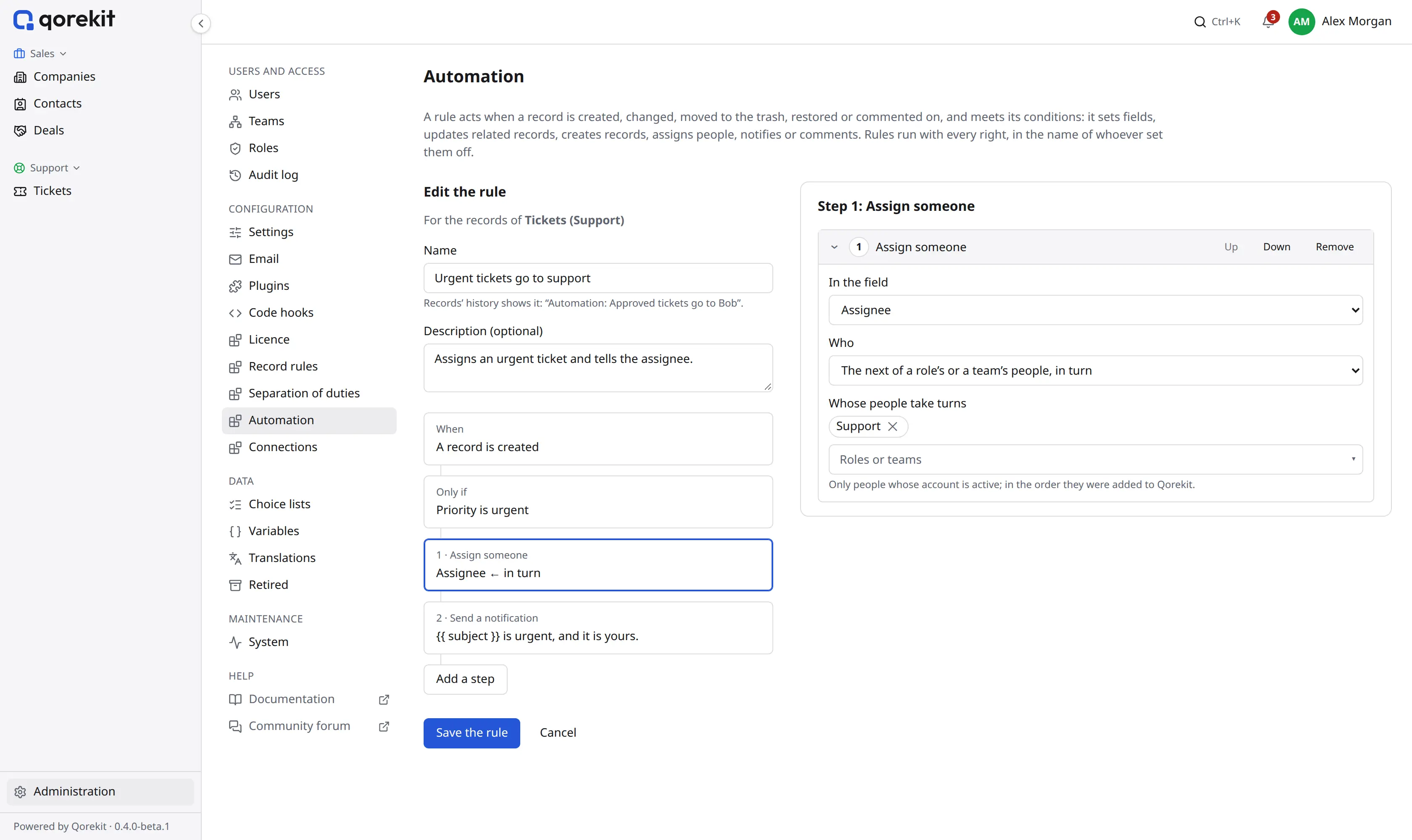
When. What sets the rule off. A rule for records that are changed can wait for some fields only: Only when one of these fields changes. Rules of time are below; Another rule runs it makes a rule that only the step Run another rule of other rules sets off, to share steps between them.
Only if. The record, as the change left it, matches conditions on its fields, as in a list's filter. Two more narrow it: Done by (people, roles or teams) and Through (the interface, the API, an import, or automation). "Status changes to Approved" is the field Status among the changed fields, and the condition Status is Approved.
The steps, in order.
| Step | What it does |
|---|---|
| Set fields | Sets fields of the record: to a value, copied from another field, to a formula (TODAY() + 3, amount * 1.2), or emptied. A field that holds several people or records can have some added or taken away, whoever set the rule off among them |
| Update related records | Sets fields of the record's parent record, its sub-records, the records a relation field points at, or records that point at it; a filter narrows them. Up to 500 records a step |
| Create a record | Creates a record with the fields set as the step says, as a sub-record of this one or linked to it through a relation field |
| Assign someone | Puts a person in a user field: a given person, the person in another field, whoever set the rule off, or the next of a role's or a team's people in turn. Only people whose account is active are chosen |
| Send a notification | A message under the bell of the people chosen: given people, the people of a user field, a role or a team, the record's followers, or whoever set it off. The message can name the record's fields (below). Someone who may not see the record is not told; a field they may not see stays empty |
| Send an email | An email in Qorekit's layout to people (as for a notification), everyone who may see the record, the addresses in an email field of the record or of a record it points at (a project's customer's email, through the project's Customer field), or given addresses. The subject and the body can name the record's fields (below); replies can go to a given address or the one in an email field, and the files of file fields can be attached (10 MB in all, only those the reader may see). Someone who may not see the record gets nothing; an address that is no one's in Qorekit gets the email as the rule's author sees the record |
| Send an SMS | A text message through an SMS connection to the numbers in phone fields of the record or of a record it points at (a project's customer's mobile), given numbers, and people (at the mobile number verified on their account; those without one are left out). The text is plain and can name the record's fields (below); a number outside Qorekit gets it as the rule's author sees the record. With Send to set to a yes/no field (an "SMS allowed" field of the customer), numbers of a record go out only if that field is Yes; given numbers and people always get it. Each number gets one message |
| Add a comment | A comment written by the rule, "Automation: …", which can name the record's fields (below). Fields that some people may not see stay empty in it. A rule run by a button can write it in the name of whoever pressed the button instead |
| Send a request | A request to another service: through a connection (its address, signing in and headers) or to an address of the step's own. The address, query values, headers and body can name the record's fields, as the rule's author sees them; the body is JSON or text written in the step, form fields, or the record itself as JSON. Values of a JSON answer can be saved into the record's fields. An answer other than 2xx fails the step (below) |
| Find and update a record | Finds the record of an entity whose field (text, email, phone, a number) holds a value, written in the step or copied from the record, and sets fields of it; when none is found, it can make one. With several found, the oldest is changed |
| Copy the record | A copy of the record, with some fields set otherwise (the due date a month later: DATEADD(due, 1, "month")) and, if you like, its sub-records. The copy goes under the same parent record; files, unique fields and numbers Qorekit gives are not copied |
| Move to the trash | The record goes to the trash, where it can be restored from |
| Run code | Runs a code hook of the kind Automation step for the record, and sets the fields it returns. Only super admins put it in a rule, and a rule that runs code is theirs alone to change |
| If… else… | Steps for when the record, as it is then, matches conditions, and steps for when it does not. Up to three levels inside each other |
| Wait | A while (minutes, hours or days), or until a date of the record (such as a day before the due date), up to a year; then the next steps. By default the rule's conditions on the record are checked again first: if the record no longer meets them, the run stops |
| Run another rule | Runs a rule of the entity made to run only from other rules, for the same record, if its conditions hold |
| Stop | The rule takes no more steps |
Texts that name the record
Notifications, comments, emails and SMS (written in a step, or as a message template) are written as templates (Twig):
{{ title }}puts in a field's value, as the record page shows it: Yes or No, a person's name, several values joined by commas.{{ customer.city }}reads a field of the record a relation points at;{{ customer }}alone is its title.{{ priority.value }}is the number of a choice.{% for line in record.lines %}{{ line.item }}{% endfor %}repeats for each sub-record (up to 50);record.urlis the address of the record's page.{% if amount > 1000 %}…{% else %}…{% endif %}writes text only when a value says so.actor.nameis who set the rule off,recipient.namewho reads it,site.namethe installation's name, andnowthe date and time.{{ form.reason }}is what the button's form got, for a rule run by a button;{{ form.reviewer.name }}the name of a person chosen in it.- Filters shape a value:
{{ due|date('d M Y') }},{{ total|money('EUR') }},{{ note|default('none') }},{{ title|upper }}.
You don't have to type these: Insert a value, under each text, lists what the record holds (its fields, fields of the records its relations point at, its sub-records and the others above) and puts the one you pick where the cursor is. Preview, under the step, fills the text in with a record of yours: as you see it, as an address outside Qorekit gets it, or, for administrators, as someone else would see it. For an email, Send me a test sends it to your own address.
Each reader gets the text filled in with what they may see: a field, a related record or a sub-record they may not see stays out. A comment, which everyone with access reads, names only the record's own fields that everyone may see. Templates can't set variables, include other templates or count up in ranges; a text that names a field the entity does not have is refused when the rule is saved.
Emails, SMS and their templates. How an email is formatted and lists records in tables, how long an SMS is, how many of each rules send in an hour, and the templates that serve many rules are in Message templates.
Rules of time
A date of the record comes. The rule follows a date or a date and time field of the record, or when the record was created or last changed, and runs at times around it: on the day, or a number of days (or hours, for a date and time) before or after. A rule can have several times, such as 3 days before, 1 day before and on the day. For a date, it runs at the time of day chosen (09:00 unless you say otherwise), in the installation's time zone. "Still New 3 days after it was created" is the time 3 days after the record was created, and the condition Status is New.
- Each time runs once for a record. If the date changes (a due date put off), the new times run too.
- Times before the rule was made, turned on or given new times do not count: a new rule does not run for the past.
- If scheduled work did not run for a while, a time up to 7 days late still runs; older ones are left out, and the runs say so.
On a schedule. Every day, on days of the week, on a day of the month (the 31st is the last day of a shorter month) or of the year, at a time of day.
- For each record that matches the conditions: every Monday, the open tickets. Up to 500 records a minute; the rest follow.
- Once, without a record: the rule only creates records. This is how a task repeats ("on the 1st of each month, the task Pay the rent"). A task that repeats from its own date is a date rule with Copy the record.
- A time scheduled work missed by more than a day is left out.
Rules of time look at the record as it is then: not at what changed, who did it, or through which door. They run from scheduled work. Without cron it runs after page requests, so they may come late; administrators see a notice saying so while such a rule is on.
Requests from other services
A rule whose trigger is A request comes in is set off by another service: an online shop when an order is paid, a form on a website, a payment service. Once the rule is saved, it shows its secret address; give it to the other service, which sends a POST with a JSON or form body to it. Make a new address ends the old one.
Such a rule has no record of its own: its steps create records or find and update one. Their fields take values From the request: body.email is the field email of the body, body.customer.name one inside it, and query.ref a value of the address's query.
Take only signed requests makes a signing secret, shown once: give it to the service. A request must then carry X-Qorekit-Timestamp (Unix seconds, within 5 minutes) and X-Qorekit-Signature: sha256= and the HMAC-SHA256 of the timestamp, a dot and the body, with the secret. Each address takes 60 requests a minute, of up to 256 KB; the answer is 202 at once, and the rule runs in the queue.
Requests to other services
Send a request reaches only addresses on the public internet, so that no rule can read the server's own network; an administrator can list hosts inside it in Connections. Redirects are not followed, a request waits 15 seconds at most, and up to 1 MB of the answer is read. Values of fields go into the address URL-encoded, and into a JSON body escaped as inside a JSON string: write the quotes around the value too, as in this body:
json
{"title": "{{ title }}", "customer": "{{ customer.email }}"}Buttons
A rule whose trigger is Someone presses a button runs when a person presses its button: on a record, beside Edit, or in the bar of a list's chosen rows, for each of them. "Approve", "Send the quote", "Reject, with a reason".
How it looks. A label, an icon and a color (plain, prominent, or red for what cannot be undone). Buttons with the same menu name share one menu, so that a record with many buttons stays tidy.
Who sees it. Everyone who may see the record, or only some: roles, teams (with the teams under them), the people in a user field of the record (its reviewer, say) or whoever created it. By default only people who may change the record see it; untick Only for people who may change the record for a button that people who only look at records may press too. The rule's conditions say on which records the button works, as the record is then (its fields, not what changed): elsewhere the button is hidden, or shown greyed out with a warning ("Only new tickets can be approved"). All of this is checked again when the button is pressed.
Asking first. A button can ask a question before it runs ("Reject this ticket?") and have a form of up to ten inputs: short or long text, a number, a date, yes or no, one of some choices, a person. An input can be required. The steps take its values with From the form, and texts name them:
twig
{{ title }} was rejected by {{ actor.name }}: {{ form.reason }}Running. Pressed on a record, the rule runs at once, and the person reads how it went: the button's message (a text that can name fields and the form's values, as above) or, when a step failed, why. The record then shows its new values; Then: Go back to the list leaves it. Steps that wait, and those that fail and are tried again, go on later as for any rule. While a run of the button on the record is still going on, it can't be pressed again there.
For a list's chosen rows, the button runs for up to 500 records at a time, after the answer comes; the records it does not work on (or is not for the person on) are left out and counted. Each record gets a run of its own under Runs, where the record's history also names the rule.
When rules run
Rules run with every right, in the name of whoever set them off: the record's history and its Changed by name that person, and comments the rule writes name the rule.
So that managing rules gives no more than one has, a rule saved by someone who is not a super admin keeps to what they may do themselves. The same is checked when they turn a rule on, or try a run of it again:
- its steps, inside If too, write records only of entities whose rules they manage; a rule it calls keeps to that as well;
- it copies, works out from and judges by only fields they may see, and sets only fields they may change (field permissions);
- it does not put them, or whoever sets it off, in a person field of records they do not all see;
- it uses a connection only when a super admin shared it with rule managers.
Emails, SMS and requests to addresses, numbers and services (not to people of the installation) are written as the person who last saved the rule, or last changed its message template, sees the record. When they may not see it, nothing is sent about it: the run fails and says why. Notifications and messages to people are written as each of them sees it.
- After saving (the usual way): the change is saved first, then the rule runs, at once after the page answers, or from scheduled work. The conditions are judged as the change left the record; the steps see the record as it is when they run. A record moved to the trash before its rule ran is skipped, except by rules for records moved to the trash.
- Before saving: for records that are created or changed, a rule can set fields in the save itself, through every door (the interface, the API, imports). Only Set fields steps run this way. If a value it sets is refused, the save stops and the message names the rule.
Several rules of an entity run in the order of the list; Up and Down change it. Changes made by several records at once, and imports, set rules off for each record.
Importing without rules
When importing records from CSV, people who manage the entity's automation rules see Run automation rules for these rows, ticked. Unticked, the import's rows set off no rule, before saving or after: useful to bring in old records without sending emails or assigning anyone. Others who may import always import with the rules, so they cannot step around them. Qorekit's own notifications are sent either way.
Chains of rules
A rule hears people's changes. Also when other rules change records lets it hear the changes of other rules too. So that rules cannot set each other off without end:
- a chain stops after five links;
- a rule does not run again on the same record in one chain.
A run stopped this way shows as Skipped in the runs, with the reason.
Trying a rule
Try it, beside Save the rule, shows what the rule would do for a record you choose, and does nothing: no record is changed, and no email, SMS, request or notification goes out. It tries the rule as it stands in the editor, saved or not, so a rule can be tried before it is turned on.
For each step, it shows:
- the fields it would change, from what to what, and the records it would create, move to the trash or comment on;
- the email, SMS or notification it would send, and to whom, written as you see the record (never what only a recipient may read); the request it would make (header values are left out, as they may hold secrets);
- Would fail, and why, where the save would be refused: a required field left empty, a value already taken. The steps after it are Not reached, as in a run.
Steps read the record as the steps before them left it. If… else… shows the branch the record takes; Wait says until when it would wait, and goes on without waiting; Run another rule tries that rule after this one, as it would run. Run code does not run: code may do anything, so what it returns is not known. Under the steps, the try names the rules its changes would set off in turn.
The try judges the conditions on the record as it is. A rule that runs when something changes, or for someone, has nothing to look at in a try: those conditions are not judged. When the record does not meet the rule's conditions, the try says so and shows the steps anyway.
- A rule run by a button asks for its form; a rule run by a request, for what the request would bring (JSON). A schedule that runs once, without a record, needs no record.
- You see what you may see: fields hidden from you are left out, and counted.
- Tries are not runs: they are not kept, and do not show in Runs.
Starting from a template
Start from a template, beside Add a rule, offers ready rules for the entity chosen above:
| Template | What it does |
|---|---|
| Tell people when a record is given to them | When a user field changes, the new person gets a notification |
| Hand new records out in turn | Each new record goes to the next person of a role or a team |
| Note the day a status is reached | When a choice field changes to a value, today goes into a date field |
| Remind someone the day before a date | At 09:00 the day before, a person of the record gets a notification |
| Warn when a date has passed | The day after, if the record has not reached a value, a person gets a notification |
| Send a welcome email | A new record with an email address gets a welcome email |
| Create a record every Monday | At 09:00 each Monday, a new record: a weekly task, a review |
| A button that marks a record done, with a reason | Mark as done asks for a reason, sets a choice field and comments |
| Create a record from a request | Another service sends a name; a record is created with it |
A template asks for the fields it works with (the person field, the date field, a choice field and its value, a role or a team), among those of the right kind. One the entity lacks the fields for is greyed out, and says what it needs. The rule then opens in the editor, unsaved: change its texts and times, Try it, and save it.
Duplicate, in the list, copies a rule to the end of its entity's list, turned off, with "(copy)" after its name: a start for a rule much like another.
A rule's history
Each save that changes what a rule does keeps a version of it: its name, trigger, conditions, steps and button. Turning it on or off, and changing the order of the list, are not versions. What changed (optional), above Save the rule, puts a few words beside the version.
History in the editor lists the versions, newest first, with who saved each and when. A version opens to show what it did and where it differs from the rule now. Go back to this version makes the rule what it was then, saved as a new version: it is checked as any save, so a version that names a field since deleted is refused. The newest 50 versions of each rule are kept.
Each run says which version of the rule ran (in Runs, opened).
Deleted rules
A deleted rule stops at once, and waits in Recently deleted (under the list of rules) for 30 days. Restore brings it back turned off: check it, then tick On. A rule that a request sets off keeps its address. After 30 days, a deleted rule goes for good, with its versions.
Runs
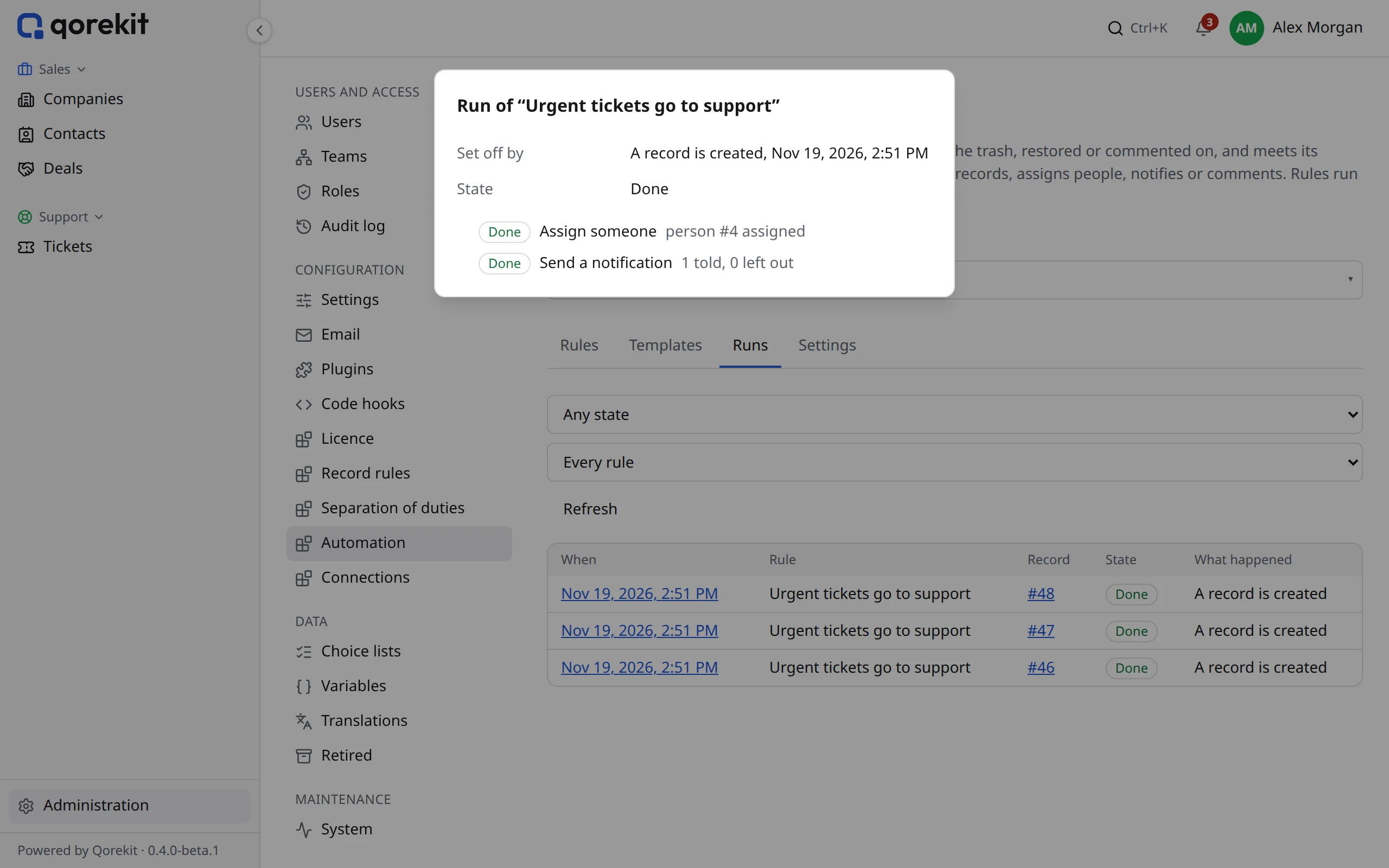
The Runs tab lists each time a rule ran, newest first: the record, its state, and what each step did, branches of If… else… under it. A run that waits says until when; one ended by Stop, or by a record that no longer met the conditions after a wait, is Stopped.
- A run that fails is tried again by itself after 1, 5 and 15 minutes, then stays Failed. Try again from the step that failed runs it again, after the rule or the record is put right; steps already done are not done twice.
- Runs are kept for 30 days; in the Settings tab, an administrator can keep them from 1 to 365 days.
Scheduled work must run for rules to be tried again (see The System page); without cron, it runs after page requests.