

Appearance
Requests
Rules can talk to other services both ways. Send a request calls another service: your accounting, a chat, any web API. A request comes in is the other way: another service (a shop, a form on your website, a payment service) calls Qorekit, and the rule runs.
A connection
A connection keeps where requests go and how they sign in, so that rules don't repeat it and secrets stay in one place, kept encrypted.
- Open Administration › Connections and click Add a connection.
- For: Requests of rules.
- Name:
Accounting. - Address:
https://books.example/api. Each request's path is added to it. - Signing in: what the service asks for: A bearer token, An API key in a header (with its Header name), An API key in the address, A user name and password, or No signing in. Then type the Token (or the key, or the password). It is not shown again.
- Click Save the connection.
To check it, type a path in the connection's try box (/status, say) and click Send: it shows the answer's status and how long it took. More in Connections.
Send a request: a won deal makes an invoice
Step: Send a request. When a deal is won, an invoice is made in the accounting service, and the invoice's number comes back into the deal.
Before you start: the connection Accounting above, and a short text field Invoice number on Deals.
Administration › Automation, Entity: Deals, Add a rule.
Name:
Won deals are invoiced.When: A record is changed, only when Stage changes.
Only if: Stage is any of Won.
Add a step: Send a request:
- Connection: Accounting (https://books.example/api).
- Method: POST.
- **Path under https://books.example/api**:
/invoices. - It sends: JSON written here.
- Body, with Insert a value into the body for the values:
json{ "customer": "{{ company }}", "title": "{{ title }}", "deal": "{{ record.url }}" }- Under Save from a JSON answer (optional), click Add a value to save. Type
invoice.number, and choose Into the field: Invoice number. If the service answers{"invoice": {"number": "INV-1042"}}, the deal's Invoice number becomes INV-1042.
Save the rule.
Values go into a JSON body escaped, as inside a JSON string: write the quotes around them, as above. To send every field of the record, choose It sends: The record, as JSON instead. Query values and Headers can be added too.
If the service answers with an error (anything other than 2xx) or does not answer within 15 seconds, the step fails. The run is tried again after 1, 5 and 15 minutes; then it waits for you in the Runs tab, where Try again from the step that failed sends it again (When a run fails).
Without a connection, choose Connection: None: a whole address, and type the whole address in Address. Requests reach only addresses on the public internet; an administrator can allow hosts of your own network in Connections, under Addresses inside your network.
A request comes in: a contact form opens a ticket
Trigger: A request comes in. Step: Find and update a record. The contact form of your website sends what a visitor typed to Qorekit. The rule finds the visitor among the contacts by their email (or adds them), and opens a ticket.
A rule without a record
A rule that a request sets off is not about a record. Nobody created or changed anything in Qorekit: a request came in. So:
- There are no conditions: there is no record to look at. The Only if box disappears when you choose this trigger.
- The only steps are Create a record and Find and update a record: the rule makes records, or finds one and changes it. Steps that would act on "the record" (notifications, emails, Set fields) are not offered.
- Values are To a value, From the request or Emptied. They can't be copied from a field or worked out by a formula: there is no record to read them from.
- Create a record can't make a record of a sub-entity (an activity of a deal), since there is no parent record to put it under.
To send a message about a ticket that a request made, use a second rule of Tickets, on A record is created, with Also when other rules change records ticked.
The rule
Entity: Tickets, Add a rule, Name:
Contact form.When: A request comes in. Its settings say that the rule gets its address once it is saved.
Add a step: Find and update a record:
- A record of: Contacts.
- Whose field: Email, holds the value: From the request, Where in the request:
body.email. - Under Set its fields, Add a field: First name, From the request,
body.name. Again for Phone,body.phone. - Tick When none is found, make one with these values.
Add a step: Create a record. A record of: Tickets. Under Its fields:
Field How Value Subject From the request body.subjectDescription From the request body.messagePriority To a value Normal Status To a value Open Save the rule.
body.email is the field email of the request's body; body.customer.email would be one inside customer; query.ref is the value ref of the address's query (?ref=…).
When several contacts have the email, the oldest is changed. The ticket and the contact are made by separate steps; the ticket's Customer is not filled in by this rule.
The address
- In the list of rules, click Contact form to open it again.
- Click the When box. Its settings show The rule’s address, a long secret address. Click Copy.
- Give it to your website's form, or to the service, as the address to send a POST to, with a JSON or form body.
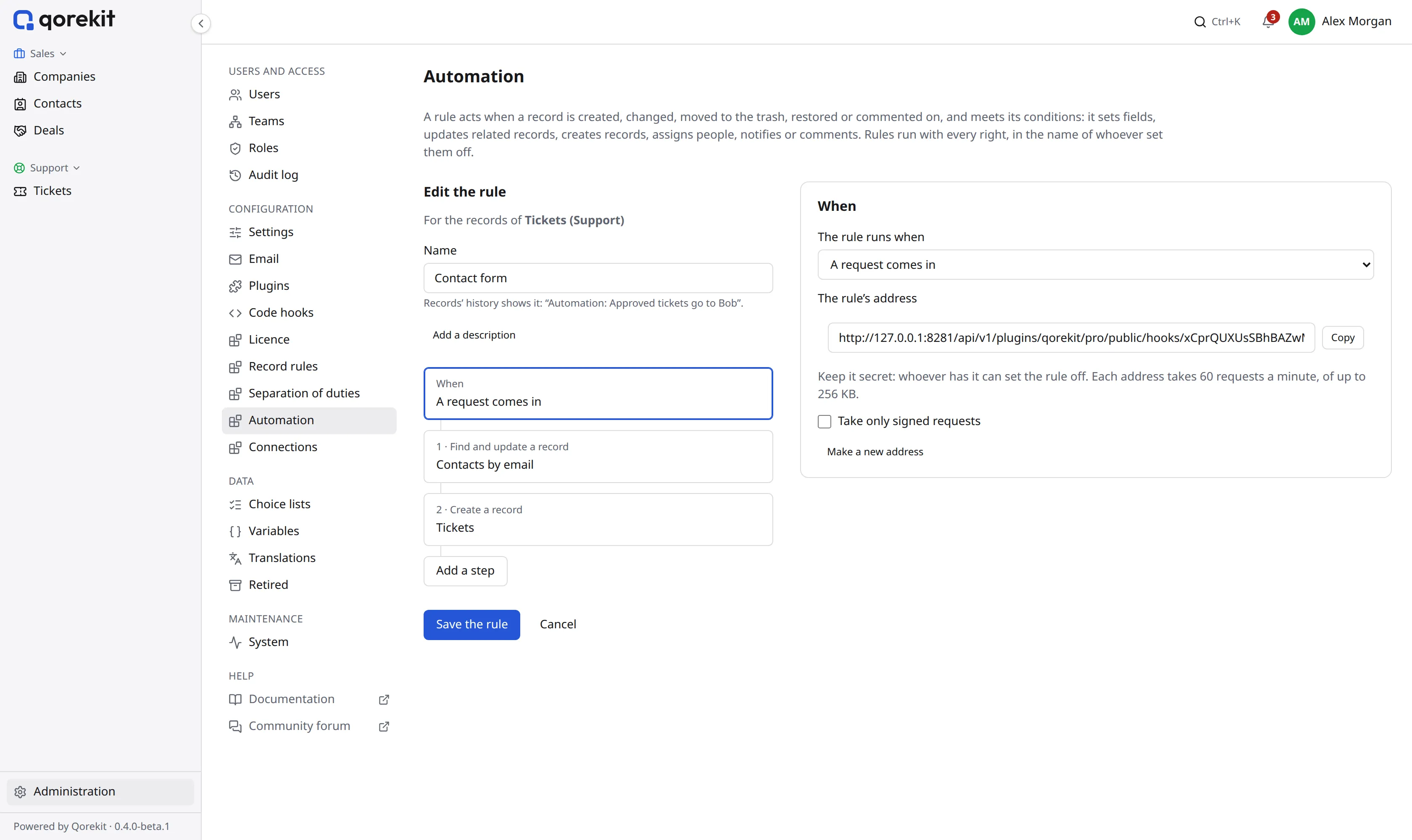
Keep the address secret: whoever has it can set the rule off. If it gets out, click Make a new address; the old one stops working. Each address takes 60 requests a minute, of up to 256 KB.
Try it from a terminal, with your address:
bash
curl -X POST 'https://crm.example.com/api/v1/plugins/qorekit/pro/public/hooks/…' \
  -H 'Content-Type: application/json' \
  -d '{"email": "jane@example.com", "name": "Jane", "phone": "+1 415 555 0132", "subject": "The invoice is wrong", "message": "Invoice 1042 counts two seats; we have one."}'
The answer is 202 at once; the rule runs in the background (scheduled work runs it). The Runs tab then shows the run, and the contact and the ticket it made are in their lists.
Signed requests
A secret address is often enough. For more, tick Take only signed requests: a Signing secret, shown only now appears. Click Copy and give it to the service; Qorekit does not show it again.
From then on, each request must carry two headers:
X-Qorekit-Timestamp: the time, in Unix seconds, within 5 minutes of Qorekit's clock.X-Qorekit-Signature:sha256=and the HMAC-SHA256, in hex, of the timestamp, a dot and the body, with the secret.
For example, in a shell:
bash
body='{"email": "jane@example.com", "subject": "Hello"}'
timestamp=$(date +%s)
signature=$(printf '%s.%s' "$timestamp" "$body" | openssl dgst -sha256 -hmac "$SECRET" | sed 's/^.* //')

curl -X POST "$ADDRESS" -H 'Content-Type: application/json' \
  -H "X-Qorekit-Timestamp: $timestamp" \
  -H "X-Qorekit-Signature: sha256=$signature" \
  -d "$body"
A request without a right signature gets 401, and the rule does not run.
Find and update in other rules
Find and update a record works in rules about a record too. There, the value looked for can be Written here or From a field of this record: for example, a rule of Tickets that finds the company whose Name holds a text field of the ticket, and sets fields of it. The field to find by is a text, email, phone, web address or number field. The record found can't be of a sub-entity.